How to reduce bulk restore errors using Related Object Types
The most common cause of errors while performing bulk restores is that the Salesforce organization is missing related reference records.
Spanning displays the related object types for the chosen records on the "Restore Settings" page to help you identify the related records.
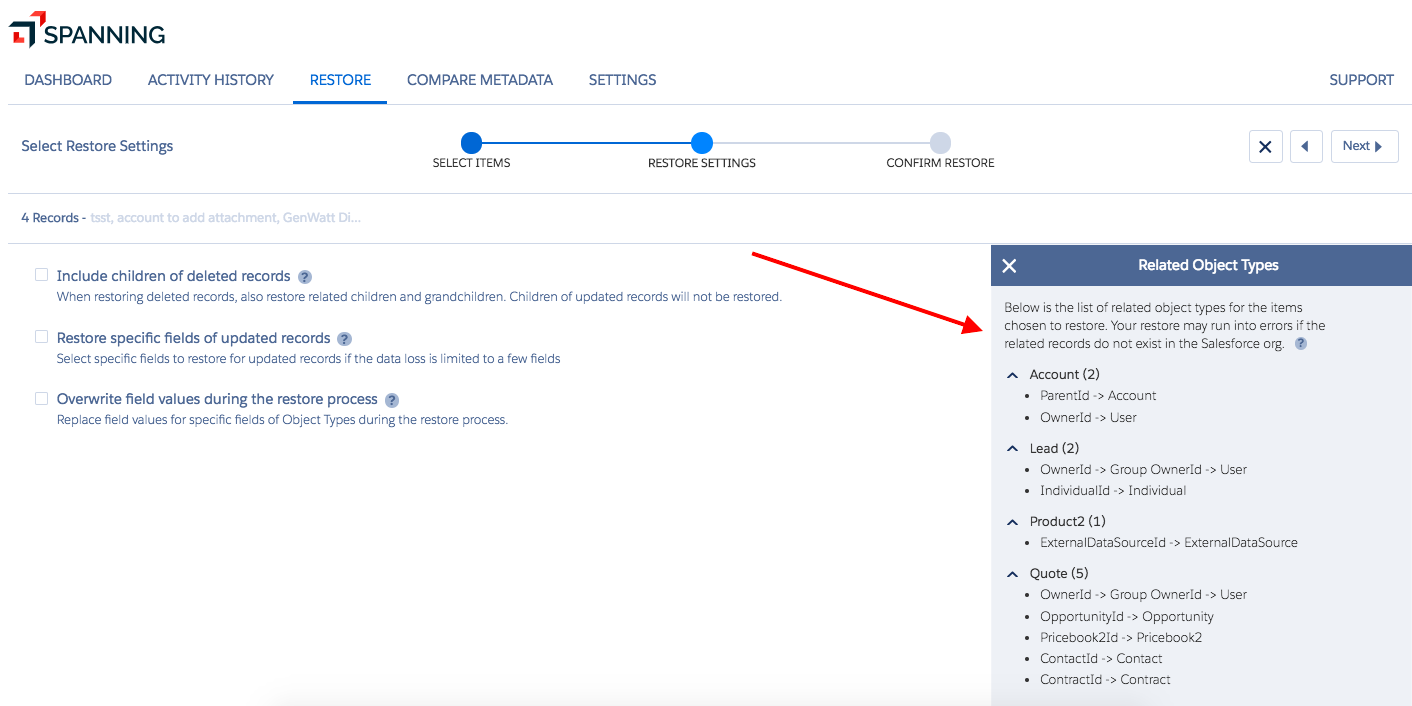
The Related Object Types panel shows the object types of the items you have chosen to restore and displays specific fields that are related to other Object Types.
IMPORTANT To prevent restore issues, please ensure that the related records are in the target Salesforce organization before you initiate the bulk restore.
If you're uploading a CSV file for the bulk restore, you can include the related records in the CSV file and restore everything together.
For records related by a master-detail relationship, you can choose to automatically restore child records during the restore.
If the related records field values are not required, you can choose to overwrite the field values using blank values.
IMPORTANT Doing this will break the referential integrity of the data, so be careful when choosing this option.
If you have any questions, please contact support through: https://one.kaseya.com/support


